Wordapp: Crossword Maker1.3.1
Publisher Description


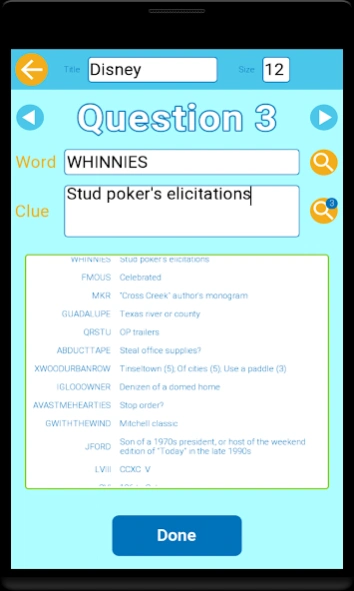

Make your own crossword puzzle with automatic layout, clue search and easy share
Making a crossword puzzle from scratch is not an easy task. But with the help from Wordapp, it will be a piece of cake. Both the process and outcome should be enjoyable🤞.It's a great tool for crossword constructor and make the constructing easier.
Features🤞:
🍕1 Automatic layout of the crossword grids. Based on the collection of words user inputs, Wordapp will automatically search for the best layout for the puzzle.
🍔2 Huge sources of clues from professional crossword puzzles and dictionaries. This crossword clue database will make the creator’s life easy.
🍟3 Easy load and save function. Users can share the generated puzzle with friends by external APPs. After the other user got the puzzle, he or she can click the puzzle directly choose the Wordapp to open it. Or the user can use the ‘import’ function from the Wordapp.
🍿4 Export as a standard puz format which could be open by exact the same Wordapp or even some other APPs.
🌭5 The wordapp can even import puzzles from other APPs only you have the puz file from them and then you can play with it.
🍖6 The puzzle could also be exported as image format. With the image, you can share or print to hard copies.
🍖7 A word list editor for saving your words. You can choose a subset from it as the input for the crossword generator.
🍖8 A crossword editor for manual editing the crossword puzzle.
Typical workflow🐱👤:
🎈Start from clicking ‘New’.
🎈Optionally type the puzzle title and title size.
🎈Input a word or optionally with the help from random dictionary.
🎈Input the clue or optionally with the help from the crossword clue database.
🎈Repeat previous two steps until you have enough word clue pairs.
🎈Click ‘Done’ and a puzzle will be generated.
🎈Play it by yourself.
🎈Share it with friends.
🐱👤 Improved workflow:
Whenever you encountered a new word, add the word to a ‘word list’ and save.
Of course, you can add a group of words into a ‘word list’ for a crossword.
Then you can choose a subset of a word list as the input for the crossword generator. Next follow the typical workflow.
In this way, you have the chance to fine tune the input words for the crossword generator.
🐱👤 Enhanced workflow:
Not satisfied with the automatically generated puzzle? That’s total fine.
And you can manually edit the generated puzzle with the crossword editor!
Enjoy, create and share🌹!
About Wordapp: Crossword Maker
The company that develops Wordapp: Crossword Maker is PocketStar. The latest version released by its developer is 1.3.1.
To install Wordapp: Crossword Maker on your Android device, just click the green Continue To App button above to start the installation process. The app is listed on our website since 2026-09-13 and was downloaded 4 times. We have already checked if the download link is safe, however for your own protection we recommend that you scan the downloaded app with your antivirus. Your antivirus may detect the Wordapp: Crossword Maker as malware as malware if the download link to com.minikara.crosswordmaker is broken.
How to install Wordapp: Crossword Maker on your Android device:
- Click on the Continue To App button on our website. This will redirect you to Google Play.
- Once the Wordapp: Crossword Maker is shown in the Google Play listing of your Android device, you can start its download and installation. Tap on the Install button located below the search bar and to the right of the app icon.
- A pop-up window with the permissions required by Wordapp: Crossword Maker will be shown. Click on Accept to continue the process.
- Wordapp: Crossword Maker will be downloaded onto your device, displaying a progress. Once the download completes, the installation will start and you'll get a notification after the installation is finished.
Program Details
System requirements
Download information
Pricing
Version History
version 1.3.1
posted on 2026-09-13
Put every word on the puzzle.
• Choose Compact (tight grid) or Place all words
• Place all words keeps your full list and grows the grid if needed
• Words that share letters stay connected when possible
• Extra word groups sit side by side so the page is not a tall skinny strip
version 1.3.0
posted on 2026-08-24
Make and print better puzzles.
• After generating, see exactly which words did not fit — edit the list or keep this puzzle
• Single-letter words are no longer allowed
• Ink saver print mode: white background, no black blocks, thicker grid lines (great for classroom copies)
• Zoom and pan large puzzles with + / − or pinch
version 1.2.8
posted on 2025-08-30
Upgraded target Android API level.
version 1.2.7
posted on 2024-08-24
Upgraded target Androd SDK API level.
version 1.2.6
posted on 2024-04-22
Added local price in the shop item description.
version 1.2.3
posted on 2023-12-09
Fixed a crash bug when the user made a puzzle of only one clue.
version 1.2.2
posted on 2023-09-25
Fixed crash bug from loading extra long words.
Fixed ANR bug when the user playing a one word puzzle.
version 1.2.1
posted on 2023-09-13
Added search feature for the word list editor.
version 1.2.0
posted on 2023-09-12
Added My Words screen. The users can use this screen as a vocabulary note book and select part of their word list to make different crosswords.
version 1.1.7
posted on 2023-09-05
Bug fix for missing columns of the printed image.
